Hide Google AI Overviews with a Free Chrome Extension
RidOfAI is a free Chrome extension and AI Overview blocker, with a separate switch for Google AI Overviews, AI Mode and Bing Copilot.
To remove rust from cast iron, scrub the affected area with steel wool, rinse, dry it completely and apply a thin layer of oil before reheating…
How to scrub, rinse and re-season a rusty skillet.
Vinegar soak or steel wool: what works and when.
Oil, oven temperature and how many coats to apply.
Free · Runs locally · No account
What the AI Overview blocker hides
A generated answer
AI Overviews
Controls for supported generated answers, heading boxes and follow-up inputs.
AI Mode entry points
A separate switch for supported tabs and buttons, with direct AI Mode pages left available.
A generated summary
Bing Copilot
Controls for supported answer elements and links on Bing results pages.
People also ask
An optional switch for the question-and-answer module. It starts off.
How to install the Chrome extension
Add RidOfAI from the Chrome Web Store
Use the Add to Chrome button on this page. The same Chrome extension installs in Microsoft Edge. It starts hiding AI Overviews right away.
Open RidOfAI from the extensions menu
Pin it to the toolbar if you want quick access. Open the popup to review the main switch and individual search controls.
Choose a search view
Keep individual hiding controls, enable the optional Web filter, or temporarily use Show on this page. Saved settings apply to supported open pages.
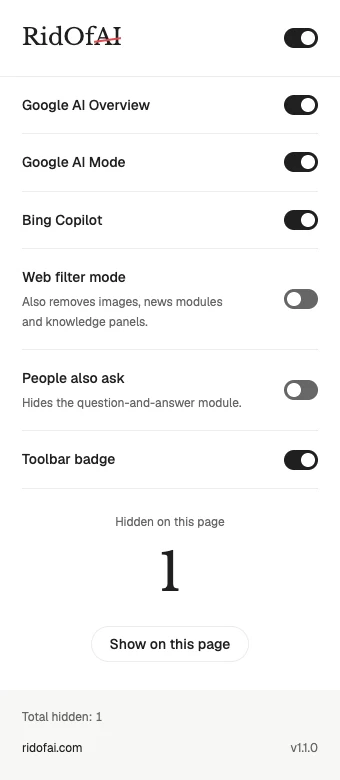
The controls stay close
The main switch controls all hiding features. Individual switches keep preferences separate. Hidden on this page reports the current page count, while Total hidden stays on your device.
Show on this page restores content temporarily. The toolbar badge is optional, and the Web filter starts off so it does not change the wider results view unless you choose it.
Two permissions, limited page access
Your search history stays local
The extension does not save or upload search queries or browsing history. It has no analytics SDK. Rule data is retrieved without account credentials or user identifiers.
The website has a separate policy for optional analytics and accounts. Read the privacy policy for storage, retention and deletion details.
Chrome extension or Web filter?
| Approach | What changes | Useful when |
|---|---|---|
| Individual extension controls | Selected supported elements are hidden locally | You want separate switches in desktop Chrome or Edge |
| Google Web default | The browser requests a text-link search view | You prefer Web results or use a phone browser |
Set Google Web as the default search engine, or learn how to get rid of AI Overview on any device.
Frequently asked questions
What is an AI Overview blocker?
An AI Overview blocker is a browser extension that hides supported AI-generated sections in search pages. It changes the page you see locally rather than changing a Google account setting. RidOfAI provides separate controls for AI Overviews, AI Mode entries and Bing Copilot, with an optional People also ask switch.
Which browsers can use the Chrome extension?
The desktop package is for Chrome and Microsoft Edge. It does not run inside Chrome on Android, Chrome on iPhone, Safari or the Google app. For those devices, use the Google Web setup instructions instead. Install it from the Chrome Web Store with the button on this page.
How is the extension different from Google Web?
The extension targets individual elements inside supported search pages. Google Web requests a different search view using udm=14 and can also remove image groups, news modules and knowledge panels. The extension includes an optional Web filter mode, but that setting starts off so you can choose the behavior yourself.
Can I show hidden content again?
Yes. Open RidOfAI and select Show on this page. That temporarily restores hidden content for the current page; reloading applies the saved preferences again. You can also turn off an individual switch or the main switch, and the change takes effect in already-open supported pages.
Why does it need storage and alarms?
Storage saves preferences through browser sync and keeps rule data and counts on the device. Alarms schedule a rule-data check every twelve hours. Site access is limited to supported Google home and search pages and Bing search results, where the content scripts need to run.
Does it send my searches to a server?
No search queries or browsing history are saved or uploaded by the extension. Its rule-data request omits account credentials and identifiers. Installation and removal open website pages, which have a separate privacy policy. Hiding counts stay local, and no analytics SDK runs in the extension.
Can I still use AI Mode?
Yes. A direct AI Mode page remains available. The separate AI Mode control concerns supported entry points such as tabs and buttons in ordinary search pages. The extension does not delete account history, disable AI services for your account or change the browser’s own AI features.
Last checked: November 12, 2026
Get rid of AI Overview in one click
Free for Chrome and Edge. Runs locally on your device.
Add to Chrome — it’s free